
Table of Contents
How B2B Trade Shows Fit Into Commercial Orchestration?
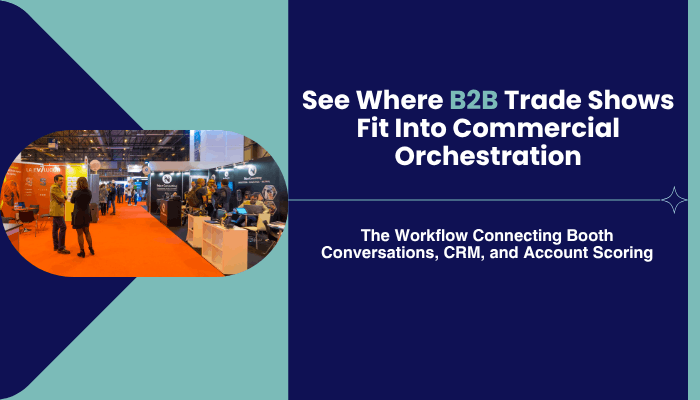
Three purchasing managers from the same company arrive at a B2B Trade Show in Germany and find themselves at the same exhibit booth. At this time, one manager inquires as to the price, another inquires about the timeline, and yet a third has asked to see a demonstration of their products. A fourth manager had downloaded a white paper from the company website later that afternoon.
By the end of the day, the white paper download would be stored in the CRM (Customer Relationship Management) system. However, none of the information generated during the four interactions with the supplier at the Trade Show, including two instances where pricing was discussed, one instance regarding timelines, and one where the role of stakeholders was identified, will reach the account record, which contains all pertinent details for that particular company. Most of this data will remain in a spreadsheet and will either arrive too late to be used effectively or will have been incorrectly assigned to the incorrect record.
What is Commercial Orchestration?
Commercial orchestration is the concept of bringing together ALL signals generated by an Account (website visits, email responses, product use, B2B trade show conversations, etc.) into ONE shared record. This way, sales, marketing, and customer success can view the entire picture of an account rather than each team viewing their own individual portion of it.
Losing three booths (from the same buying committee) is much larger than losing one booth. According to Forrester’s 2026 State of Business Buying report, today’s B2B purchases typically go through nine external influencers and thirteen internal stakeholders. A single unmatched badge scan is rarely enough to cost you a sale.
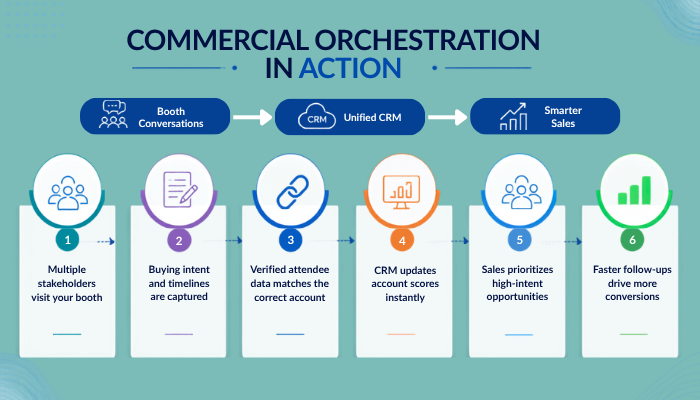
What Signals Feed Into Commercial Orchestration?
Digital activity syncs into the account record on its own. A website visit, an email reply, a spike in product usage, each lands within minutes and feeds everything downstream: scoring models, sales alerts, account health dashboards, marketing automation, and ABM platforms (the tools that target advertising and outreach at specific named accounts).
A booth conversation follows a much slower path. Even one involving three named stakeholders usually waits on someone to export a spreadsheet and upload it whenever they get around to it.
| Signal | What Happens To It |
|---|---|
| Website, email, product usage | Syncs into the account record automatically |
| Trade show attendee data | Reaches the account record days later, if at all |
| Account record | Feeds the account score |
| Account score | Sets sales priority |
Why Trade Show Signals Matter For Account Scoring?
An account score only reflects what got entered into it. Demandbase’s State of the B2B Buyer report found that 72% of B2B purchases now involve multi-stakeholder, high-complexity buying groups, spanning IT, operations, finance, and end users rather than sitting with one department. A trade show puts several of those departments at the same booth on the same day, something a website or an email campaign rarely manages.
A three-day trade show can end with hundreds of badge scans and only a handful of live conversations that actually confirmed a stakeholder’s role, timeline, or decision stage. Those few conversations carry more usable detail than a month of an account’s digital activity, and most of them sit unprocessed for days before anyone enters them into the account record.
Also read- The Rise of Buying Groups at B2B Trade Shows
Where Do Trade Show Conversations Get Lost Before Reaching CRM?
Most trade show conversations never reach CRM because a badge scanner only captures a name, an email address, and a company name. Title, decision stage, timeline, and a match to the correct CRM account rarely travel with it.
| Badge Scan Captures | CRM Needs To Match It |
|---|---|
| Name | Standardized contact record |
| Verified work email | |
| Company | Normalized company name |
| Missing from most scans | Title, company size, industry |
| Missing from most scans | Matched CRM account |
Half the fields sit empty in a file inside someone’s downloads folder for days after the show closes.
How CRM Matching Creates Duplicate Trade Show Leads
Even a same-day upload still has to clear one more hurdle: matching. Salesforce’s standard duplicate rule matches on an exact email address, and a badge scan rarely provides one. A badge scan using a personal email address or a work email that differs slightly from the one on file creates a new Salesforce Lead by default rather than updating the Contact already tied to that account. A Lead sits unmatched on its own; a Contact is tied to a company that already exists in the system. In practical terms, that badge scan lands as its own disconnected record instead of attaching to the account it actually belongs to. HubSpot’s domain-matching feature follows a similar pattern, creating a new Company record whenever a contact’s email domain fails to match one already in the system.
| Platform | Result When A Record Fails To Match |
|---|---|
| Salesforce | Creates a new Lead instead of updating the existing Contact |
| HubSpot | Creates a new contact, and often a new Company, when the domain goes unrecognized |
This is where the account from the opening example ran into trouble. Two of the three procurement managers had scanned their badges with personal email addresses. Both scans created new Salesforce leads instead of updating contact records on the existing account.
When a rep looked at the account three weeks later, only one of the three conversations showed up, as a bare note missing a title, missing a timeline, and missing any mention of the other two people who’d asked about pricing and implementation. He called the one contact he could see, got a noncommittal answer, and moved on. A competitor who’d worked the same show called all three back within the week and won the deal.
How Do You Get Trade Show Data Into Salesforce And HubSpot?
Merging duplicate records by hand after the badge is scanned is the wrong fix. Verified trade show attendee data that already carries title, company size, and industry lets a CRM place a scan against the right account on the first attempt, without the merge someone does by hand a month later.
Syncing attendee records through a direct API integration removes the export-and-upload step entirely. Records synced this way land in the account record while the show is still running, days before a spreadsheet would even leave someone’s inbox.
Also read- How to Get Verified Exhibitor Contacts in Minutes with Smart List Builder?
What Changes Once Trade Show Data Reaches The Right CRM Account?
Run the account from the earlier example through this instead: all three procurement managers scan in with a CRM match already attached. Within a day, the account record shows three named stakeholders with titles, sitting next to the same account’s two recent visits to the pricing page, and the score reflects a full buying committee showing intent at once.
The rep who calls three weeks later never happens. The follow-up goes out within a day to the person who actually asked about implementation timelines.
The same shift plays out at scale:
• Multiple attendees from one company land under a single account rather than three separate leads
• Sales alerts, account health scores, and ABM segments all draw from the same booth conversation instead of a note buried on one contact record
How Do You Choose Which B2B Trade Shows Are Worth Attending?
Getting one show’s data this clean takes effort, and few companies have the resources to run every event that way. A mid-market software company with a six-person marketing team learned that the hard way after staffing 40 shows in a year and drowning in badge scans from all of them; narrowing down to the dozen that reliably drew multi-stakeholder visits from target accounts meant fewer scans to process but more of them turning into actual sales conversations.
Attendee data identifies which specific person from an account showed up. Exhibitor list data from the same event adds who else they stopped by, useful context for how the first sales call gets framed. Teams picking which shows to staff often check an event calendar by country or industry-specific event data first, since some events draw far more multi-stakeholder visits than others.
Also read- What Can You Do With Exhibitor and Attendee Data Before a Trade Show?
Why Do B2B Trade Shows Belong In Commercial Orchestration?
Trade shows put a large share of an account’s buying committee in front of one booth on one day. Whether that turns into a pipeline depends on whether the badge scan behind it reaches the account record clean enough for the CRM to recognize it, the same match problem that separated the three procurement managers from the account that should have flagged them.
ExhibitorsData supplies the exhibitor and attendee intelligence, backed by documented data compliance, that gets booth conversations into the account score the same week they happen instead of the same quarter.
Frequently Asked Questions
What is trade show attendee data?
Trade show attendee data is verified information about the people who visit a booth, typically including name, title, company, and contact details, structured so a CRM can match it to an existing account.
How do companies capture trade show leads?
Most companies capture trade show leads by scanning badges at the booth, then exporting the results to a spreadsheet for manual upload after the event ends.
What is CRM-ready attendee data?
CRM-ready attendee data is attendee data that is already matched to an existing account before import, rather than left for someone to match by hand.
Why do badge scans create duplicate leads?
Badge scans create duplicate leads because CRM deduplication checks for an exact email match, and a badge scan often uses a personal address or a slightly different work email than the one already on file.
What is the difference between attendee data and exhibitor data?
Attendee data covers the buyers and decision-makers who visit an event, useful for pipeline generation and account scoring. Exhibitor data covers the companies showcasing products, useful for partnership research and competitive context.
How do RevOps teams use trade show data?
RevOps teams use trade show data to update account records and refresh account scores, the same way they’d use a website visit or an email reply.
OEM vs ODM vs Contract Manufacturing: What Exhibitor Descriptions Reveal About Who Builds What?
OEM, ODM and contract manufacturing are listed together in the hundreds of pages of exhibitors at every expo; they determine which party has ownership of the design, the tooling and the final manufactured product. The...